

You’ve upgraded Magento successfully.
The site is live. Pages load. Orders are coming in.
So everything is fine… right?
Here’s the uncomfortable truth:
Most Magento issues don’t appear on launch day. They appear quietly in the weeks after.
This guide shows exactly what store owners should monitor in the first 30 days after a Magento upgrade—to protect revenue, performance, and customer trust.
No fear. No fluff. Just a clear, week-by-week plan.
This is why a realistic Magento upgrade timeline doesn’t end at go-live but extends into post-upgrade monitoring and validation.
Why the First 30 Days Matter More Than Go-Live Day
Post-upgrade issues usually:
- Trigger only under real traffic
- Appear in edge cases (specific products, coupons, payment methods)
- Show up as silent failures (no errors, just lost revenue)
That’s why “we’ll fix it if something breaks” is risky—
because many things break without announcing themselves.
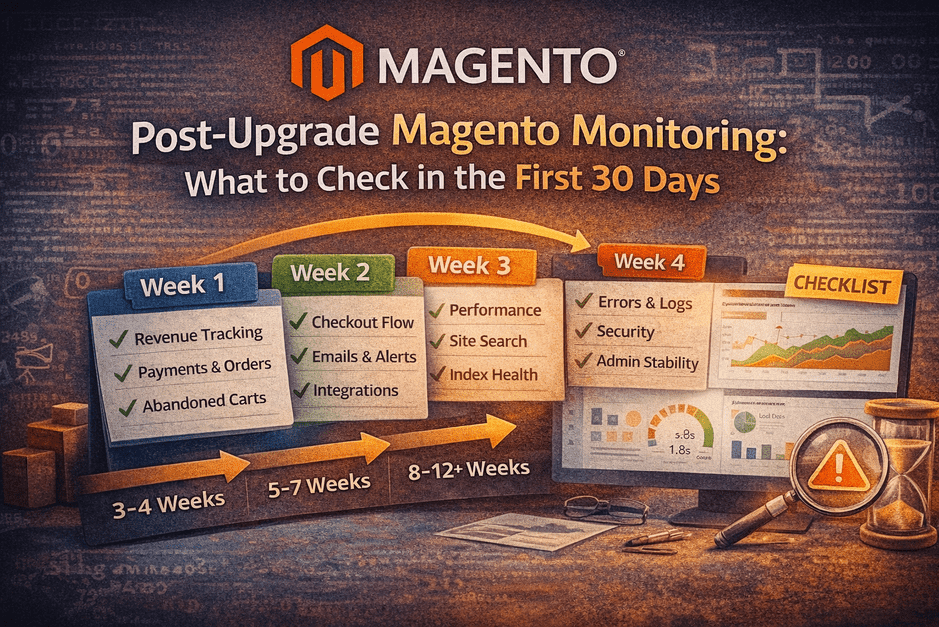
Week 1: Revenue & Order Monitoring (Daily Checks)
Goal: Confirm money is flowing correctly.
What to Track Daily
- Order volume vs pre-upgrade baseline
- Payment success rate (authorize → capture → confirm)
- Abandoned cart rate
- Refunds & cancellations
- AOV changes
Red Flags
- Orders drop but traffic is stable
- Specific payment methods underperform
- Sudden increase in abandoned carts
🚨 Silent checkout failures often start here.
Week 2: Checkout, Emails & Integrations
Goal: Ensure the entire order lifecycle works end-to-end.
Checkout & UX
- Add to cart (all product types)
- Coupon application
- Shipping & tax calculation
- Mobile checkout flow
Emails & Notifications
- Order confirmation emails
- Invoice / shipment emails
- Admin alerts
Integrations
- Payment gateway callbacks
- ERP / CRM / OMS sync
- Inventory updates
- Webhooks & APIs
If emails or integrations fail, customers lose confidence—even if orders succeed.
Week 3: Performance, Search & Index Health
Goal: Ensure the site stays fast and discoverable.
Performance
- Page load time (home, category, PDP, checkout)
- Core Web Vitals
- Cache hit ratio
- Server resource usage
Search & Catalog
- Category pages loading correctly
- Search relevance & filters
- Indexers status
- Cron jobs health
Red Flags
- Slow admin panels
- Search returning odd results
- Indexers stuck or re-running frequently
Week 4: Errors, Logs & Security
Goal: Catch hidden issues before they escalate.
Logs to Review
exception.logsystem.logdebug.log- PHP warnings & notices
Admin & Backend
- Admin page load time
- Order processing speed
- Background jobs (cron) reliability
Security
- Patch verification
- Extension vulnerabilities
- Suspicious login attempts
- File permission checks
Logs don’t complain loudly—but they reveal the truth.
Many of these post-upgrade issues can be identified early through a free Magento upgrade audit before they silently impact revenue or checkout stability.
Common Red Flags Store Owners Miss
- “Orders are coming, so it’s fine”
- “No customer complaints yet”
- “We’ll check logs later”
- “Performance looks okay on my laptop”
These assumptions are how minor issues become major incidents.
Several of these issues are often missed when relying only on surface-level checks, which is why understanding the difference between a free vs paid Magento audit matters.
How Smart Store Owners Handle Post-Upgrade Care
They don’t rely on hope.
They use a structured post-upgrade monitoring plan, usually including:
- Daily revenue checks (Week 1)
- Weekly integration & performance reviews
- Log monitoring & alerts
- Minor tuning before peak traffic hits
This is why many businesses opt for a 30-day Post-Upgrade Care Plan—
not because the upgrade failed, but because success needs protection.
Final Thought
A Magento upgrade isn’t finished at go-live.
It’s finished when revenue, performance, and stability are proven under real usage.
The first 30 days decide whether an upgrade is remembered as:
- “Smooth and stable”
or - “That upgrade that caused weird issues later”
👉 Want Help Monitoring Your Store After Upgrade?
If you’d rather focus on business while experts monitor your store:
Post-Upgrade Care (30 Days)
- Revenue & checkout monitoring
- Performance & log reviews
- Issue prevention before escalation
No pressure. Just peace of mind.
Many growing stores choose a post-upgrade Magento care plan to monitor performance, security, and order flow during the critical first 30 days after upgrade.
